
Features

Everything you need to mix.

Every feature below is in every plan, in the Windows and Mac apps and in the web app.

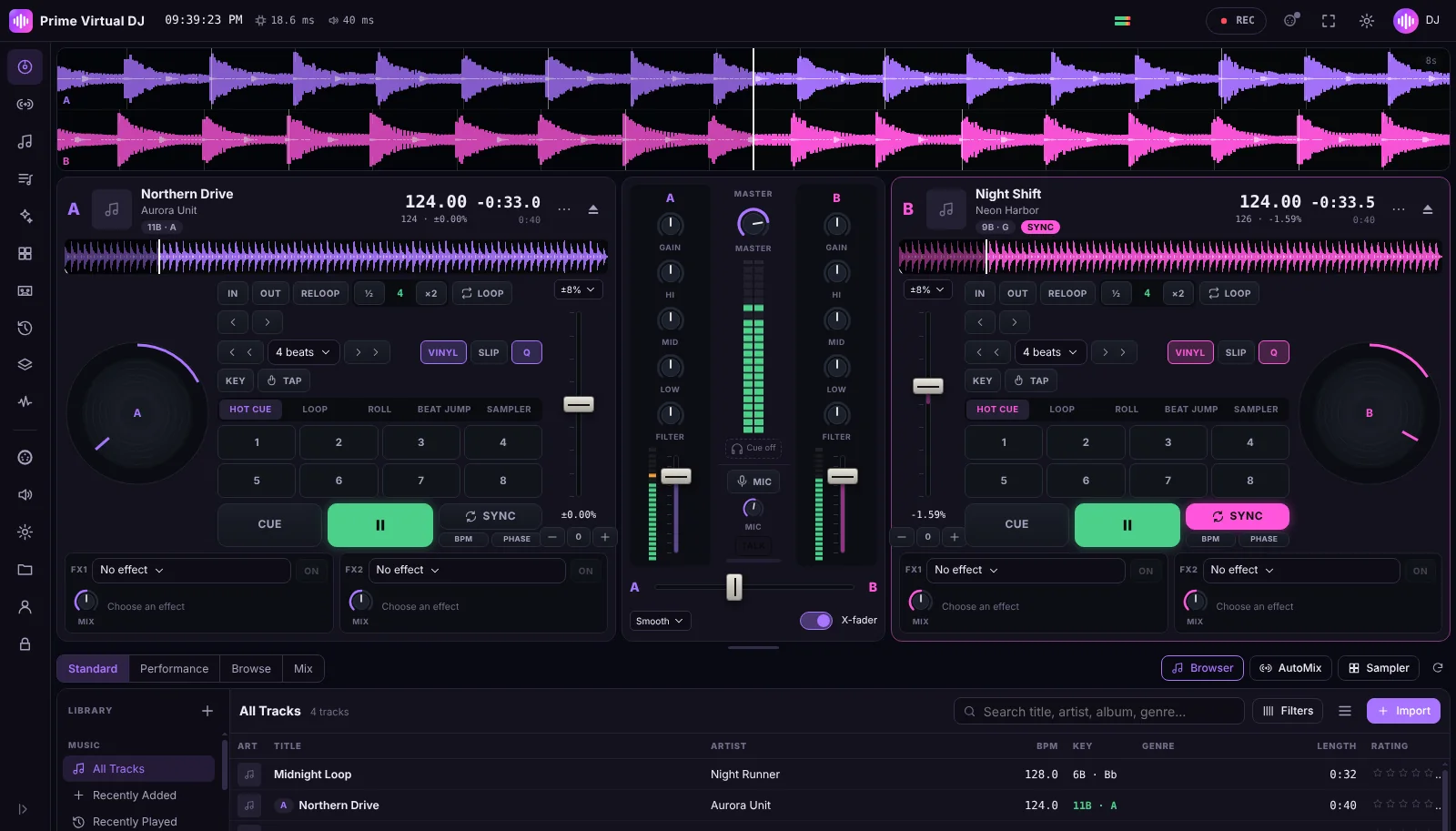
Two decks playing with the mixer in the middle.

Two decks, built for flow

Load a track on each deck and mix with a full-width waveform overview, a zoomable waveform per deck and a jog wheel.

  • Play, cue and a pitch fader with ranges from ±4 % to ±100 %
  • Sync to the other deck, beat-phase match
  • Key lock (master tempo)
  • Vinyl and slip modes, quantize

Automatic track analysis

Every track is analysed in the background so you can see where the music goes and which tracks fit together.

  • BPM and beatgrid detection
  • Musical key in Camelot and classic notation
  • Waveform overview of both decks

A real mixer

Shape each channel the way you would on hardware.

  • Gain, 3-band EQ and filter per channel
  • Channel faders, crossfader with curve options
  • Level meters and master volume
  • Headphone cue on a second audio output

Performance pads

Eight pads per deck with five modes.

  • Hot cues (saved with the track)
  • Auto loops and loop rolls
  • Beat jump
  • Sampler pads with your own sounds

10 beat-synced effects

Two effect units per deck, each with a mix control.

  • Echo, Delay, Reverb, Flanger, Phaser
  • Filter, Bitcrusher, Distortion, Tremolo, Gate

Your music library

Import your own files and keep them organised.

  • MP3, AAC/M4A, WAV, AIFF, FLAC, OGG and Opus
  • Playlists and rule-based smart playlists
  • Search, filters, ratings, history

AutoMix

Queue tracks and let Prime Virtual DJ mix them with tempo-matched transitions — perfect for warm-ups or a break.

  • Queue from playlists or the library
  • Transitions: automatic, beatmix, fade or cut, with adjustable length

Record your mix

Record the master output and keep your sets.

  • Recordings list with playback and export
  • Microphone talk-over channel

MIDI controllers and shortcuts

Map the controls of a class-compliant MIDI controller with MIDI learn, or use the keyboard.

  • MIDI learn mapping
  • Keyboard shortcuts

Desktop and web

What is different between the apps

Windows & Mac appsWeb app
DJ featuresAllAll
Where your music isStays on your computer; files are read where they areUploaded to your private library on primevirtualdj.com
InternetOnly to activate and renew; works offline up to 14 daysRequired
InstallInstaller for Windows (.exe) or Mac (.dmg)None
Counts as a deviceEach activated computerEach registered browser

Honest about limits

What Prime Virtual DJ does not do

  • No streaming-service integration — you play music files you own.
  • No stem separation and no AI features.
  • No ASIO or dedicated low-latency drivers: audio uses your operating system's standard output.
  • No ready-made controller presets: map your MIDI controller with MIDI learn. No HID controllers.
  • No phone or tablet apps.

System requirements

Runs on the computer you already have

Windows

Operating system
Windows 10 or Windows 11, 64-bit (x64)
Audio
Any output Windows provides; a second output (e.g. a USB audio interface) for headphone cueing is optional. No ASIO.
Internet
Needed to activate; then works offline for up to 14 days at a time
Controllers
Optional class-compliant MIDI controller (mapped with MIDI learn)
Download

macOS

Operating system
macOS 13 Ventura or newer
Processor
Apple Silicon (M-series) or Intel — one universal app
Audio
Any output macOS provides; a second output for headphone cueing is optional
Internet
Needed to activate; then works offline for up to 14 days at a time
Controllers
Optional class-compliant MIDI controller (mapped with MIDI learn)
Download

Web

Browser
Current Google Chrome, Microsoft Edge or Mozilla Firefox
Device
A desktop or laptop computer (phones and tablets are not supported)
Internet
Required while you use the web app
MIDI
Web MIDI in Chrome or Edge for controllers
Launch

Your next mix is waiting.

Choose a plan from 9,99 € per month and start mixing today.